

Description
Download WebDAV Mounter – Chrome OS, WebDAV, File System
Overview
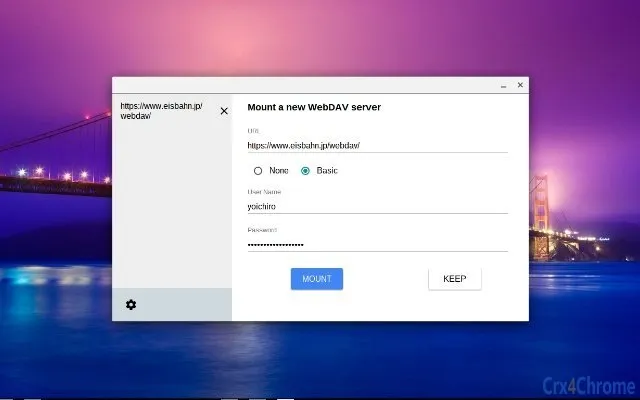
The WebDAV Mounter is a specialized desktop application designed exclusively for Chrome OS users who need to access remote file systems via the WebDAV protocol. This tool enables users to mount a WebDAV server directly into their Chrome OS file system, allowing seamless integration of remote storage as if it were a local drive. It is particularly useful for professionals and students who rely on cloud-based or networked file servers for collaborative work, document sharing, or centralized backup storage.
The software is built to operate within the Chrome OS environment using the chrome.fileSystemProvider API, ensuring compatibility with the platform’s native file handling system. It supports basic authentication only and does not include advanced features such as file locking, which may limit its use in highly collaborative environments. Despite these constraints, it offers a lightweight and focused solution for users who require direct access to WebDAV resources without the need for third-party clients or complex configurations.
Real-world usage scenarios include accessing shared project folders hosted on a company’s WebDAV server, retrieving files from a personal cloud storage service, or integrating remote repositories into daily workflows. The developer did not provide additional background information, and the tool’s functionality is limited to the core mounting operation. No external dependencies or background processes are known to be required.
Key Features & Capabilities
- WebDAV Server Mounting – Enables direct mounting of a WebDAV server into the Chrome OS file system, allowing users to browse and manage remote files as if they were stored locally.
- Basic Authentication Support – Only basic authentication is supported, which means credentials are transmitted in plain text. Users should ensure the connection is secured via HTTPS to prevent exposure.
- Local Storage for Credentials – Login credentials are stored in the local storage of the browser environment. This may pose a security risk if the device is shared or compromised.
- chrome.fileSystemProvider API Integration – Leverages the Chrome OS-native API to provide a seamless integration experience with the file manager.
- Mount Request Handling – Supports the onMountRequested event, allowing the application to respond dynamically when a mount operation is initiated.
- Metadata and Directory Reading – Capable of reading metadata and directory structures from the WebDAV server, with bug fixes implemented in recent versions to improve reliability.
These capabilities make the tool ideal for users who need a straightforward way to access WebDAV resources without installing additional software. The feature set is minimal but targeted, focusing on core functionality. The absence of advanced features like file locking or multi-factor authentication means it is best suited for low-risk, personal or internal use cases where performance and simplicity outweigh security complexity.
User Interface, Workflow & Performance
The user interface of WebDAV Mounter is minimal and designed to operate within the Chrome OS ecosystem. It does not include a traditional graphical interface but instead functions as a background service that integrates with the system’s file provider framework. Users interact with it through the Chrome OS file manager, where the mounted WebDAV location appears as a standard drive.
Workflow efficiency is high for users familiar with Chrome OS file handling. Once configured, the mount appears in the file system, and files can be opened, copied, or moved with standard drag-and-drop actions. The application’s performance is expected to be lightweight, given its small size of 1.4 MB and focus on a single task. However, exact performance details were not specified.
Stability appears to have improved over time, with recent updates addressing bugs related to metadata reading and URL encoding. The application is designed to resume operations after system restarts, though specific behavior under low-memory or high-latency network conditions is not documented. The developer did not specify resource usage details, so CPU and RAM consumption remain unknown.
Compatibility & System Requirements
WebDAV Mounter is designed exclusively for Chrome OS and is not compatible with Windows, macOS, or other operating systems. It requires a Chrome OS device with access to the chrome.fileSystemProvider API, which is available on most modern Chromebooks. The application is distributed as a Chrome App, which means it operates within the Chrome environment and relies on the browser’s runtime.
The installation size is 1.4 MB, indicating a lightweight footprint. No additional system requirements such as processor speed, RAM, or disk space were provided. The developer did not specify hardware compatibility beyond the operating system. Exact system requirements were not listed, and compatibility information was partially provided.
Pros and Cons
Pros
- Lightweight and efficient with a small file size of 1.4 MB.
- Direct integration with Chrome OS file system for seamless access.
- Supports basic WebDAV functionality with proven stability in recent versions.
- Simple setup and workflow for users familiar with Chrome OS.
- Free to download and use with no licensing fees.
Cons
- Only supports Basic authentication, which may compromise security.
- Credentials are stored in local storage, increasing exposure risk.
- No support for file locking, limiting collaborative use.
- Exclusive to Chrome OS with no cross-platform availability.
- Does not support modern authentication protocols or secure credential handling.
FAQ Section
Is WebDAV Mounter compatible with all Chrome OS devices?
The application is designed for Chrome OS and requires the chrome.fileSystemProvider API. While it is likely compatible with most modern Chromebooks, specific hardware or firmware requirements were not listed.
Can I use WebDAV Mounter offline?
Once a WebDAV server is mounted, files can be accessed locally if previously cached. However, the application requires an active internet connection to maintain the mount and access remote content.
Is the software secure?
Security depends on the WebDAV server configuration. The tool supports only Basic authentication and stores credentials in local storage. Users should ensure the connection is made over HTTPS to reduce exposure.
How often are updates released?
Updates have been released irregularly, with the latest version (1.0.6) published in September 2017. No information about future update frequency is available.
Does the software require a license?
No, WebDAV Mounter is free to download and use. It does not require a license key or subscription.
Final Thoughts + CTA
WebDAV Mounter delivers a focused, no-frills solution for Chrome OS users who need to access WebDAV servers directly from their file system. While its feature set is limited—particularly in terms of security and authentication—it excels in simplicity and integration. The tool is best suited for individuals and organizations with internal or low-risk WebDAV setups where ease of access outweighs advanced security needs.
Despite its age and lack of recent updates, the application remains functional and stable for its intended purpose. For users on Chrome OS who require a lightweight, free way to mount WebDAV resources, this tool remains a viable option. However, those requiring enhanced security or collaboration features should consider alternative solutions.
Download WebDAV Mounter now to integrate your WebDAV server directly into your Chrome OS file system.
Guides & Tutorials for WebDAV File System App for Chrome
How to install WebDAV File System App for Chrome
- Click the Preview / Download button above.
- Once redirected, accept the terms and click Install.
- Wait for the WebDAV File System App for Chrome download to finish on your device.
How to use WebDAV File System App for Chrome
This software is primarily used for its core features described above. Open the app after installation to explore its capabilities.
User Reviews for WebDAV File System App for Chrome 0
No reviews found





